Somewhere in your asset register there is probably a machine that no longer exists. It was sold, scrapped, stolen or simply lost years ago, but the record lives on. That is a ghost asset, and it is one of the most common reasons an asset inventory stops matching reality.
Key Takeaways
- A ghost asset is recorded in your books but cannot be found physically, or is no longer in service.
- The opposite problem, an orphan asset, exists on the floor but is missing from the records.
- Ghosts usually come from unrecorded disposals, transfers and data entry gaps, not from dishonesty.
- The only reliable way to find them is a physical audit reconciled against the records, repeated on a schedule.
What Is a Ghost Asset?
A ghost asset is an item that still appears in your asset register but is no longer where the record says it is, or no longer exists at all. Finance teams often meet the term in fixed asset accounting, but operations feels the same problem as a count that never matches the floor.
Its mirror image is the orphan asset: equipment that is physically present and in use but was never entered in the register, or was entered under the wrong details. Between them, ghosts and orphans are why maintaining an accurate asset inventory across facilities is harder than it looks.
How Do Ghost Assets Appear?
Almost always through ordinary process gaps:
- Disposal without a record. Equipment is scrapped, sold or traded in, and nobody updates the register.
- Transfers between sites. A machine moves, the paperwork does not, and it ends up listed at a location it left.
- Loss and theft. Portable equipment goes missing and the loss is never formally written off.
- Duplicate entries. The same item is entered twice, for example after a merger or system migration.
- Equipment sold to customers. Manufacturers lose sight of units after shipment. See why manufacturers lose track of equipment after it ships.
Why Do Ghost Assets Matter?
They are not a harmless housekeeping issue. A register full of ghosts can distort decisions in several ways:
- Depreciation, insurance and property-tax calculations may be based on equipment you no longer hold.
- Capacity plans assume machines that are not available.
- Maintenance schedules include equipment nobody can service.
- Audits take longer, and results are harder to trust.
Exact financial and tax treatment depends on your accounting rules, so confirm specifics with your finance team.
How Do Ghost Assets Show Up in an Audit?
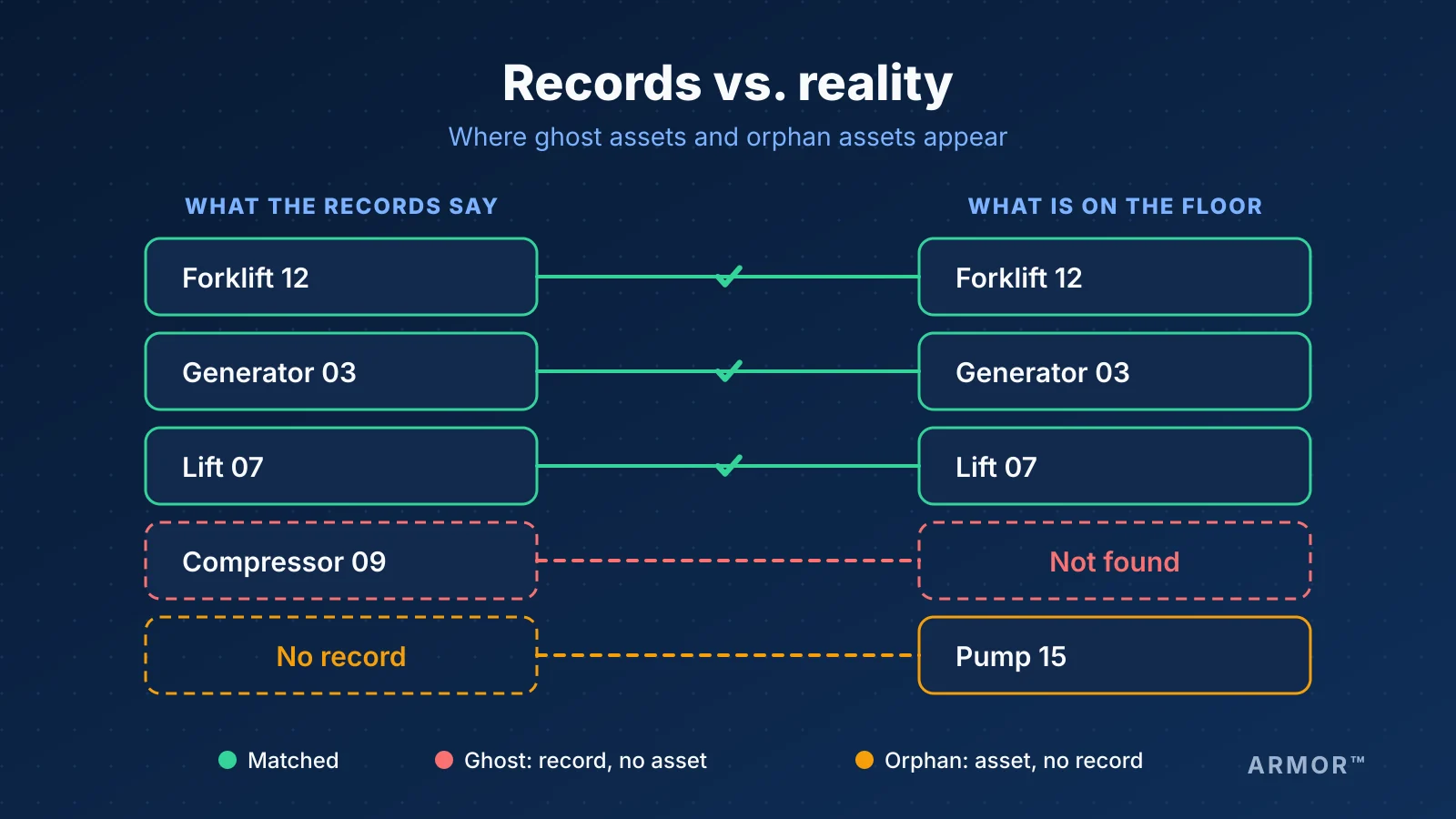
Ghosts only become visible when you compare two lists: what the records say you own, and what is physically there. Anything that appears on only one side is an exception.
- Matched: the record and the physical asset agree. Confirmed.
- Ghost candidate: a record with no physical match. Investigate transfers, disposals and recent work orders before writing it off, because many candidates turn out to be misfiled, not missing.
- Orphan: a physical asset with no record. Add it with full details.
The step-by-step walk-through, including what to capture on each asset, is set out in our equipment audit checklist. A unique tag on every asset makes each later audit faster, and which asset tag to use explains the options.
How Do You Stop Them Coming Back?
One clean-up fixes today’s register but not tomorrow’s. Lasting accuracy needs three habits. First, treat disposal, transfer and sale as events that must update the record. Second, repeat audits on a rhythm instead of waiting for year-end. Third, let live data confirm what exists: a device that reports location and runtime proves an asset is real and active without waiting for a walk-through. The trade-offs of manual counts are covered in the hidden cost of manual inventory counts.
Where ARMOR™ Fits
The ARMOR Mobile App™ lets teams photograph and tag assets during a walk-through, and the ARMOR Asset Central™ record keeps a timestamped history of runtime, location and status for each asset. Assets reporting through ARMOR 4+™, ARMOR Beacon™ or ARMOR Track™ update the record without manual entry, which makes a silent disappearance much easier to spot.
Frequently Asked Questions
What is the difference between a ghost asset and a missing asset?
A missing asset is one you expect to find and cannot, often because it was moved or lost. A ghost asset is a record with no corresponding physical item, usually because the disposal or loss was never recorded. In practice, every ghost starts as a missing asset.
How often should we audit?
It depends on how many assets you have and how often they move. Mobile equipment moving between sites benefits from more frequent checks than fixed equipment. Many teams combine a full annual count with rolling spot checks.
Can we find ghost assets without a physical audit?
Not reliably. Data analysis can flag suspicious records, such as items with no maintenance history, but only a physical check or live device data confirms what exists.
Want to see what is really on your floor? Start with the ARMOR Mobile App™ and tag your first assets.