An equipment audit is the moment a list meets reality. Done well, it tells you which assets you have, where they are and what shape they are in. Done badly, it produces a spreadsheet nobody trusts. The difference is almost always preparation and a consistent checklist.
Key Takeaways
- A good audit starts before anyone visits a site: a clean list, a defined scope and agreed fields to capture.
- Capture the same few things on every asset, and take a photo each time.
- Reconcile straight away. Anything that appears on only one list needs an explanation.
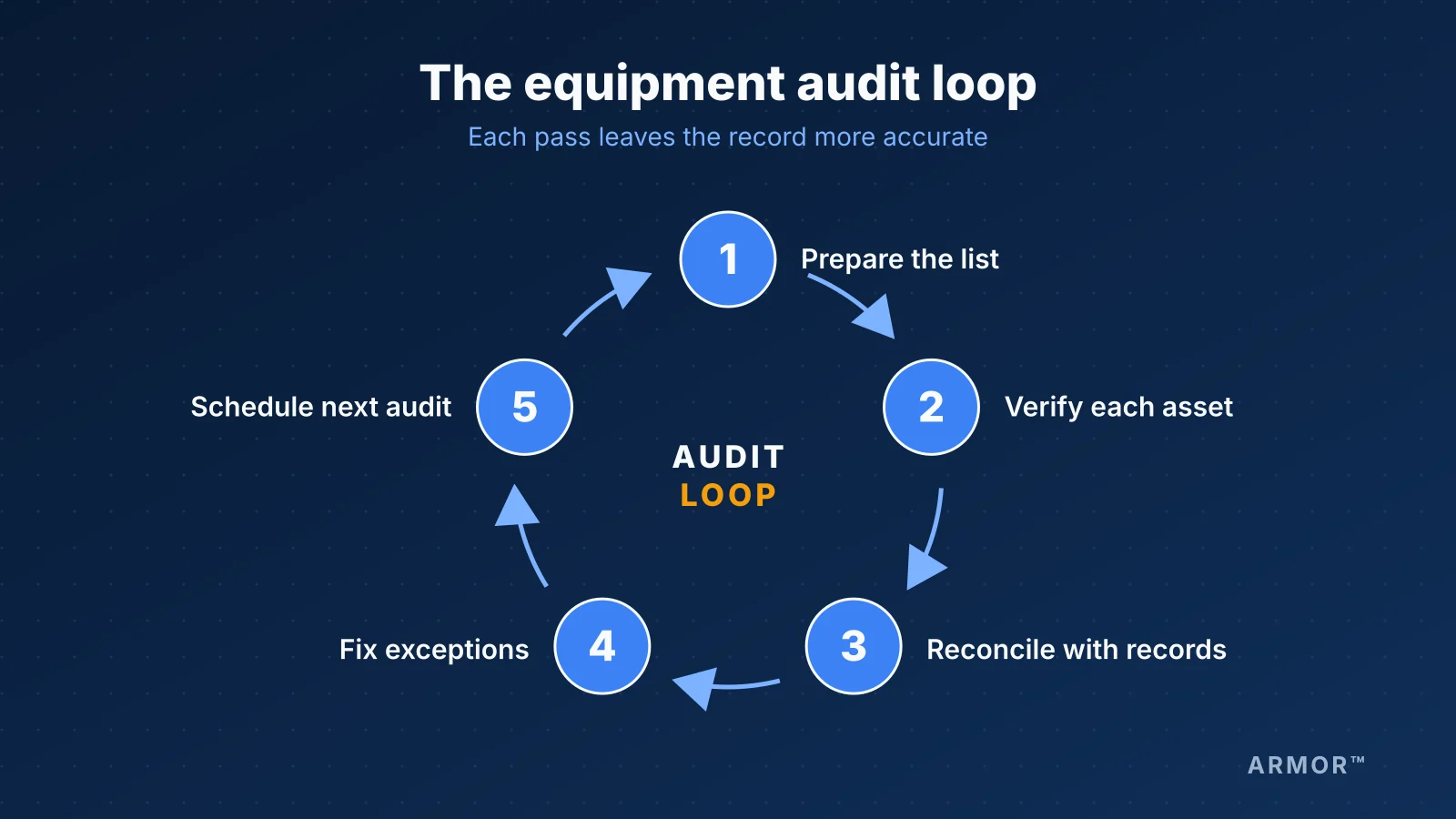
- Treat the audit as a loop. The next one should be easier than this one.
What Is an Equipment Audit For?
It answers three questions. Does each asset in the records physically exist? Is it where the records say it is? Is it in the condition the records imply? The results feed maintenance plans, insurance, budgeting and replacement decisions.
It is different from a day-to-day count of what is on a shelf, since equipment moves, is used and wears out. For background on why the manual route breaks down, see the hidden cost of manual inventory counts.
The Process at a Glance
Before You Start: Preparation Checklist
- Export the current asset list, with identifier, type, location and responsible owner.
- Define the scope: which sites, which asset classes and which dates.
- Decide the minimum fields to capture on every asset (see below).
- Make sure every asset has, or will receive, a unique tag. See which asset tag to use.
- Give each auditor the same tool and the same instructions, ideally a phone app.
- Arrange site access in advance, including customer locations.
- Plan the route so each visit covers several assets.
On Site: Per-Asset Checklist
For every asset, capture the same items:
- Identifier: scan or read the tag, and confirm the serial number against the record.
- Presence: is it there? Yes, no or found elsewhere.
- Location: the precise place, not just the site name.
- Condition: a simple scale such as good, fair, poor, plus notes for damage.
- Photo: the asset with its tag visible.
- Verified by and when: the auditor and a timestamp.
Record each one at the asset, not from memory afterwards. Notes retyped later are where errors creep in.
After the Visit: Reconciliation Checklist
- Compare results against the original list and mark each item matched or exception.
- For records with no physical match, check recent transfers, disposals and work orders before treating them as lost.
- Add assets that were found but had no record.
- Correct locations, descriptions and condition on the record.
- Escalate unexplained losses to the person responsible.
- Record the date of the audit and the next one due.
The two kinds of exception have names: records with no physical asset and assets with no record. They are explained in ghost assets: what they are and how to find them.
How Often Should You Audit?
There is no single answer. Equipment that moves often and costs a lot deserves a shorter cycle than fixed equipment. A common pattern is a full audit once a year, with rolling spot checks on high-value or mobile equipment in between. For assets where live data is available, an audit becomes a confirmation rather than a discovery exercise. For multi-site context, see how companies maintain an accurate asset inventory across facilities.
Common Mistakes
- Different formats per crew. Agree the fields once and enforce them.
- No photos. A photo settles later disagreements about what an asset was.
- Reconciling weeks later. Memory fades and the trail goes cold.
- Treating it as a one-off. Without a schedule, accuracy decays.
Where ARMOR™ Fits
The ARMOR Mobile App™ is built for this workflow: teams snap a photo in the app and tag the asset. Records land in ARMOR Asset Central™, which offers role-based views for field technicians, regional managers and executives and exportable, audit-ready reports. You can start free with up to 100 assets, with no contract or credit card required. For equipment that needs live location between audits, ARMOR Beacon™ and ARMOR 4+™ keep the record current automatically.
Frequently Asked Questions
Do we need to audit every asset at once?
No. Start with one site or one asset class, prove the process and expand. A complete audit built up in stages beats an ambitious one that never finishes.
What if the equipment is at a customer’s site?
Agree access in advance, or use a connected device so the location is known without a visit.
Can we use our existing spreadsheet as the starting list?
Yes, as a starting point. The risk is keeping it current. See how to build an accurate equipment inventory without spreadsheets.
Who should run the audit?
Someone independent of day-to-day custody of the equipment is ideal, with input from maintenance and finance.
Ready to run your first audit? Get started with ARMOR™.